Back-to-school Promotion Banner: A Versatile Tool for Your Marketing Needs
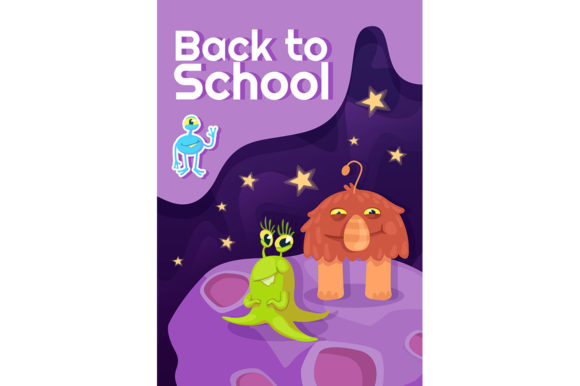
If you have ever found yourself staring at a blank canvas on Canva at 10 p.m. wondering how to make your school open house post pop, you already know the struggle. That is exactly where a ready-to-use design like the Back-to-school Promotion Banner steps in. This particular template collection comes as a modern banner with a purple and yellow background color, giving you two files: one EPS and one high-resolution JPG. And if you sit with it for a minute, you start seeing that it is way more than just a pretty graphic.
What this template collection actually does for you
Let us get the obvious out of the way first. This is a set of design files built around the back-to-school season, but it is not just about the look. The purple and yellow combo is deliberate. Purple often carries a sense of creativity and ambition, while yellow injects energy and optimism. That emotional mix is exactly what you want when you are talking about admissions, open houses, or early enrollment periods. The template gives you a structure so you do not have to reinvent visual communication every time you need a post or banner.
What makes it useful is the format. An EPS file means you can open it in vector editing software and tweak everything. The text, the shapes, the colors, all adjustable. The JPG is your quick-use version for social media or email headers. You get both flexibility and speed.
Private schools and independent early childhood centers
Think about a small Montessori school that runs its own marketing. The director is also handling enrollment tours, staff meetings, and supply orders. When admission season hits, they need something that looks professional but does not require a design degree to customize. That is where this banner fits in. They can swap out the placeholder text for their program name, add their open house date, and post it to Facebook and Instagram within 15 minutes. The purple and yellow background already does the heavy lifting of looking intentional and polished.
Tutoring centers and after-school programs
These businesses operate on a slightly different calendar. Their "back to school" push starts before school even begins. They want to catch parents early, when anxiety about fall schedules is highest. A tutoring center can use the social media post template from this collection to run a two-week campaign. First post: "Is your child ready for algebra?" Second post: "Early bird pricing ends Friday." The consistent purple and yellow theme builds recognition without them having to create a new design each time. They just open the EPS, update the offer, and export.
PTAs and parent volunteer groups
This one is less obvious but very real. PTA volunteers are often parents who are already stretched thin. They have jobs, kids, and suddenly they are also the marketing committee. They need to promote the school carnival, the uniform swap, or the enrollment drive. A banner like this gives them a starting point that does not look like a clip art disaster. They can use the JPG version directly on their school Facebook group or in a weekly email newsletter. The purple works nicely as an accent for many school colors, and yellow is readable on most feeds.
Community education programs and recreation departments
Local parks and rec departments often run after-school programs, sports leagues, or enrichment classes. Their audiences are parents looking for safe, affordable options. A template with a modern banner feel signals that the program is organized and current. These departments rarely have dedicated designers. Having an EPS file means they can take it to a local print shop or even a staff member with basic Illustrator skills and get flyers made for community centers, libraries, and coffee shop bulletin boards. The high resolution matters here because print requires sharp imagery.
How different users extract value in different ways
A school marketing coordinator might look at this and see brand consistency. They can adapt the banner to match their own color palette by tweaking the EPS, but the layout and typography structure remain solid. That saves time and keeps their materials looking cohesive across email, social media, and print.
A daycare owner might see it differently. For them, the biggest value is the JPG. They are posting to a local moms group or a neighborhood app. They do not own design software, and they do not need to. They can open the JPG in a basic photo editor, add text overlay right there, and publish. That is the difference between getting a post out today versus next week.
A parent running a small side business selling school uniforms or supplies might use the banner as the basis for a discount code offer. They are not selling education, but they are riding the same seasonal wave. The purple and yellow backdrop works for their promotional messaging just as well. They can add their logo, adjust the text, and run a limited-time offer to capture back-to-school shoppers.
A freelance social media manager serving multiple education clients will see this as a scalable asset. They can keep the EPS in their template library, duplicate it for each client, and make broad color adjustments to match different brand guidelines. The structure is already tested, so they do not waste time on layout decisions. They focus on copy and offers instead.
Practical examples of using the banner in actual campaigns
Here is how a middle school might run a simple three-post series using this template. First, an announcement post with "Enrollment Now Open" and a link to the admissions page. That goes up on Instagram and Facebook. Second, a post highlighting a specific program, maybe "New STEM lab opening this fall" with a photo swap in the banner. Third, a countdown post: "Only 10 days left for early registration." Each post uses the same base banner, so parents start to associate purple and yellow with news from that school.
A music studio offering fall lessons could do something similar but with a twist. Their banner could say "Enroll by August 15 and get your first lesson free." They might run it as a Facebook ad targeting parents within a 10-mile radius who follow local elementary schools. The high-resolution JPG works well as an ad creative because it is clean and does not clutter the message.
A church-run preschool that operates on a limited budget can print the banner as a half-page flyer using the JPG. They hand it out at community events or leave stacks at the public library. The modern design helps them compete with larger, more expensive preschools in the area.
What to think about before you start customizing
The first thing to consider is your audience's visual expectations. Purple and yellow is a strong combination, but not every school or program will have those as their colors. If your brand leans toward blues and greens, you will want to open that EPS file and adjust the hues. The template's strength is its structure, not necessarily the exact color palette. Do not be afraid to change it.
Text volume is another consideration. This banner is designed for short, punchy messages. If you try to cram in ten bullet points about your curriculum, the design will feel off. Keep your headline tight, your call to action clear, and your details in the caption or on a separate page. The banner is an attention grabber, not a brochure.
File format matters depending on where you publish. The JPG is ready for most social media platforms and email. But if you are going to print yard signs or large posters, the EPS is essential. It scales cleanly, and you can output it at any size without pixelation. Know your final medium before you commit to the JPG alone.
Strengths and limitations worth being honest about
The biggest strength of this collection is the time it saves. A professionally designed banner based on current aesthetic trends would cost hundreds if you hired someone. Here you get the structure for a fraction of that, and you only need to add your specific content. The modern purple and yellow scheme feels relevant right now, which matters when parents scroll through endless social media posts. It stops the thumb.
The grid and layout are balanced. Text areas are clearly defined, and there is breathing room so nothing feels cramped. That is harder to do on your own than most people realize. Having a professional starting point reduces the risk of amateur-looking materials that actually hurt credibility.
But there are limitations to be honest about. A single template cannot capture every brand's personality. If your school uses a very formal, traditional tone, a bold modern banner might feel like a mismatch. You can tone it down by adjusting the typeface and color saturation, but the base layout is still contemporary. It works best for programs that want to feel current and approachable.
Also, the JPG is fixed resolution. It is high resolution, but if you crop it heavily, you lose quality. The EPS solves that, but only if you have the software to open it. For someone who only uses free online tools, the JPG may be the only usable file, which limits your editing options. You can still add text overlays, but you cannot move background elements around.
Making the most of what this template offers
The best approach is to treat this as your foundation, not your final answer. Drop your copy in, look at it, and then ask yourself: does this message match the energy of the banner? If your enrollment pitch is about nurturing and calm, you might soften the yellow slightly. If it is about excitement and innovation, lean into the vibrancy. The template adapts because you are the one driving it.
Consider pairing the banner with other materials. Use it as your hero image on a landing page, then carry the purple and yellow into your sign-up form or brochure. Repetition of color builds trust. Parents will start recognizing your materials even before they read the text, which is exactly what you want during a busy enrollment season.
For anyone managing multiple campaigns across a fall season, this single template can be the backbone of your visual identity. One banner, many messages, consistent look. That is the kind of simplicity that makes marketing for schools, programs, and community services actually manageable. And in the middle of a hectic back-to-school rush, manageable is exactly what you need.