Back to School Tote Bag Mockup – Show Off Your Designs
Every back-to-school season brings a wave of fresh branding opportunities. Whether you're a graphic designer, a small business owner, or a creator preparing for the September rush, having a quick and professional way to present your tote bag designs is essential. That's exactly where the Tote Bag Mockup - Back to School Theme steps in. This digital asset lets you showcase your artwork without producing a single physical print. In this article, we'll walk through what this mockup offers, how to use it, and why it might be the perfect addition to your design toolkit.
What Is a Tote Bag Mockup and Why Does It Matter?
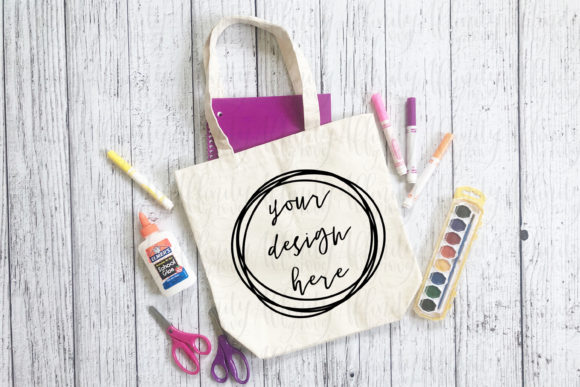
A tote bag mockup is a pre-made digital template that simulates what your design would look like on a real tote bag. Instead of photographing an actual bag or waiting for a prototype, you place your artwork onto the mockup and get a photorealistic result in minutes. The Tote Bag Mockup - Back to School Theme specifically captures the energy of the back-to-school season – think bright colors, fresh notebooks, and that excited "first day" feel. It's designed to help you present your products in a context that resonates with students, parents, and educators.
Why does this matter? Because first impressions count. When you're listing a product on an online marketplace, pitching to a school organization, or promoting on social media, a polished mockup builds trust. It shows customers exactly what they'll receive, reduces the chance of misunderstandings, and makes your work look professional without requiring expensive photography equipment.
Key Features of the Back to School Tote Bag Mockup
Let's break down what you get with this purchase. The mockup comes as a single JPG image sized at 4032 × 3024 pixels. That's a high-resolution file suitable for both web and print use. The image includes a realistic tote bag with a designated area for your design. The theme is unmistakably back-to-school, often featuring elements like chalkboard textures, pencil graphics, or a warm classroom-like lighting.
- High Resolution: 4032x3024 pixels ensures crisp details even when zoomed in or printed.
- Easy to Edit: Works with Photoshop, Canva, Stencil, or any free photo editor that supports layers.
- No Physical Product Needed: You can test variations of your design instantly.
- Watermark-Free: All watermarks and design logos are removed from the downloadable product.
- Digital Download Only: No physical item will be shipped – you receive the JPG file immediately after purchase.
Who Will Benefit from This Mockup?
The Tote Bag Mockup - Back to School Theme is incredibly versatile. Here are a few groups who'll find it especially valuable:
Graphic Designers and Illustrators
If you create patterns, quotes, or illustrations specifically for back-to-school merchandise, this mockup lets you build a portfolio of realistic product shots. Instead of showing flat files, you can present your work as if it's already printed on a bag. This makes your portfolio more engaging and helps clients visualize the final product.
Small Business Owners and Print-on-Demand Sellers
Running a print-on-demand store means you need constant mockups for new designs. This themed mockup saves you time – no need to hire a photographer or rent a studio. You can upload a new design in minutes and have a marketing image ready for your Etsy, Shopify, or Amazon listing.
Teachers and School Organizations
School fundraisers, PTA groups, and clubs often sell custom tote bags. Using a professional mockup helps you present proposals to school boards or parent communities. Even if you have no design experience, the simple overlay method described below makes it accessible.
Content Creators and Influencers
If you're launching a back-to-school bundle or a merchandise line, you can tease your products on Instagram or Pinterest using this mockup. The high-resolution image looks great on mobile and desktop, and you can add text overlays or logos without losing quality.
How to Use the Tote Bag Mockup – A Step-by-Step Guide
The beauty of this mockup is that it's designed to be straightforward. You don't need advanced Photoshop skills. Here's a typical workflow:
- Download the file from Creative Fabrica after your purchase. You'll receive a JPG image.
- Open the mockup in your preferred photo editor. Photoshop is ideal for layer adjustment, but free tools like Canva or Stencil work perfectly.
- Prepare your design as a PNG file with a transparent background. Make sure your design is sized to fit the mockup's placeholder area – you may need to resize it.
- Place your design over the mockup. In Canva, you can simply drag and drop a PNG image onto the canvas and position it. In Photoshop, create a new layer and use the transform tools to align your design.
- Adjust the blending – many mockups include shading or texture layers. For the best result, set your design layer to "Multiply" or "Overlay" mode if the mockup instructions suggest it. But usually, a simple normal layer works if the mockup has a clear white area.
- Save and share – Export as a high-resolution JPG or PNG. You can now use the image for listings, social media, or proposals.
Pro tip: If you're using Canva, look for the "Transparent background" option when uploading your design. Make sure your design is isolated from any background color so that it blends naturally with the mockup's lighting.
Strengths and Considerations
The Tote Bag Mockup - Back to School Theme has clear strengths. The resolution is high enough for print catalogs, yet the file size remains manageable for quick downloads. The themed background saves you from having to create a complementary setting – it's already built in. For busy periods like July through September, this can be a huge time-saver.
However, there are a few considerations. Because this is a digital item, you need at least basic familiarity with image editing software. The product description states: "Please only purchase if you have knowledge of how to use this product." If you're completely new to mockups, you might need to watch a quick tutorial or experiment with free editors first. Also, the mockup comes as a single JPG, not a layered PSD file. This means you can't easily adjust the bag's color or lighting independently – the mockup is fixed. But for many users, that simplicity is actually a plus.
Another point: the theme is specifically back-to-school. If you plan to use this mockup for other seasons (like Christmas or summer camp), the school-related props might look out of place. That's why it's best to purchase a mockup that fits your niche.
Real-World Scenarios and Applications
Let's look at three realistic ways you could apply this mockup:
- Online Store Listing: Imagine you're launching a line of tote bags with motivational quotes for middle schoolers. You design five different quotes. Instead of ordering five prototypes (costly and slow), you use the mockup to create listing images for each design. You can even add a short description: "Perfect for carrying books, lunch, and gym clothes." The back-to-school theme reinforces the product's purpose.
- Social Media Teaser: Two weeks before the fall semester, you post a mockup on Instagram with a countdown sticker. The image shows your latest tote bag in a school setting, creating anticipation. You can also use it in an email newsletter to your subscribers, offering a pre-order discount.
- Portfolio for Clients: A local PTA asks you to design a fundraising tote. You create three concepts and present them using the mockup. The realistic presentation helps the committee visualize the final product and makes your proposal more convincing than a flat digital drawing.
Evaluating Suitability for Your Needs
Before you buy, ask yourself these questions:
- Do I need a back-to-school context? If your target audience is students, teachers, or parents, this theme is ideal.
- Do I have the tools to edit a JPG? A free online editor is sufficient, but you must be comfortable with image placement.
- Is a single angle enough? The purchase includes one JPG image. If you need multiple views (front, back, side), you may need additional mockups.
- Am I okay with a digital-only purchase? No physical sample will be sent, so you won't feel the fabric or test the print quality – it's purely for visual representation.
If you answered yes to these, the Tote Bag Mockup - Back to School Theme is likely a strong fit. It's designed for efficiency and results, helping you move from concept to market-ready image quickly.
Final Thoughts
Mockups are a staple in modern design and e-commerce. They bridge the gap between your digital artwork and a tangible product. The Tote Bag Mockup - Back to School Theme offers a focused, high-quality solution for anyone working in the back-to-school niche. Its simplicity – a single JPG ready for overlay – makes it accessible while still delivering professional results. Whether you're a seasoned graphic designer or a small business owner looking to expand your product line, this mockup can save you time, money, and effort. Give it a try for your next project and see how a polished presentation can elevate your brand.