The Ultimate Guide to Back-to-School Social Media Templates: Design Smarter, Advertise Better
Every year, as summer winds down and the crisp promise of autumn begins to fill the air, schools, educational institutions, and tutoring centers shift into a high-energy marketing mode. The back-to-school season is one of the most competitive periods for educational advertising. Whether you are a small private preschool, a large university, or an online course platform, your ability to stand out on social media often determines how many students enroll. This is where the back to school social media template becomes your most valuable asset. In this guide, we will explore everything you need to know about using these templates effectively—from understanding their purpose and structure to practical tips for customization and deployment across Facebook, Instagram, Twitter, and beyond.
What Exactly Is a Back-to-School Social Media Template?
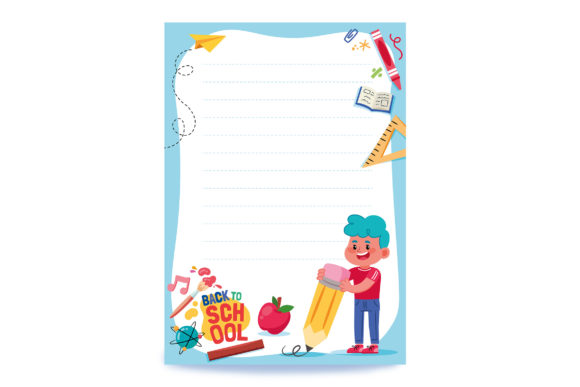
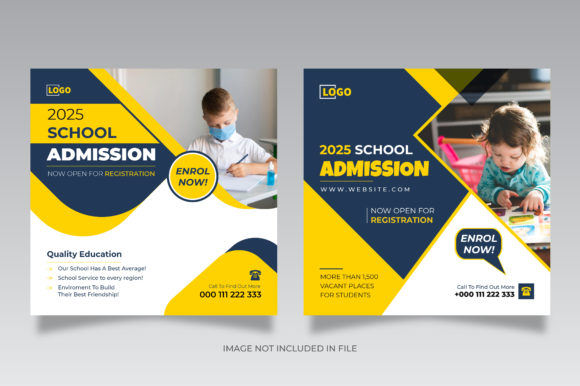
A back-to-school social media template is a pre-designed graphic layout created specifically for promoting school admissions, orientation events, open houses, or general back-to-session announcements. These templates are built to be fully editable, usually in a 1080 x 1080 px square format with an RGB color mode optimized for digital screens. They are typically delivered as AI files compatible with Adobe Illustrator CC, alongside a JPG preview for quick reference.
Most high-quality templates are organized into clear layers, making it easy for you to swap out text, change colors, insert your own school logo, or replace placeholder images. The key point here is that the image itself is not included in the main file—instead, the template provides the structure, typography, and visual framework. You supply the actual photography or branded graphics. This modular approach gives you maximum flexibility while saving hours of design work from scratch.
The Core Components of a Professional Template
When you open a well-designed back-to-school template, you will typically find the following elements layers in the AI file:
- Background layer: Solid colors, gradients, or abstract patterns that set the mood.
- Typography layer: Pre-set headline, subheadline, and body text fields using typefaces appropriate for education.
- Graphic elements layer: Icons such as pencils, graduation caps, books, school buses, or chalkboard textures.
- Image placeholder layer: A defined area marked for your own photograph or illustration.
- CTA (Call to Action) layer: Buttons or text prompts like "Enroll Now," "Apply Today," or "Learn More."
- Branding layer: Space for your school logo, tagline, and contact information.
Understanding these layers is the first step toward creating consistent, on-brand posts that resonate with your audience. The layer organization also means you can easily create multiple variations—a Facebook cover, an Instagram story, a Twitter square ad, and a web banner—all from the same base file.
Why Back-to-School Templates Matter for Modern Educational Marketing
The modern parent or student scrolls through social media rapidly. You have less than three seconds to capture their attention. A professionally designed template ensures that your message is clear, visually appealing, and aligned with your institution's brand identity. But beyond aesthetics, templates offer several strategic advantages:
Speed and Scalability
Instead of designing each post from scratch, you can customize a single template and generate an entire campaign in one afternoon. Need a Facebook ad, an Instagram square post, and a Twitter banner? Just adjust the canvas size and reposition elements. This speed is crucial during the back-to-school window when timing is everything.
Consistency Across Channels
When your Facebook ad, Instagram story, and website banner all share the same visual language, you build recognition and trust. Templates enforce design consistency—same fonts, same color palette, same tone—which reinforces your institution's professionalism.
Cost-Effectiveness
Hiring a graphic designer for every single post is expensive. With a fully editable AI template, your marketing team or even an administrator with basic design skills can produce high-quality assets. The investment in a template pack pays for itself many times over.
Focus on Message, Not Mechanics
When the layout is already handled, you can concentrate on what truly matters: your copy. What makes your school unique? What is your admission deadline? What benefits do students get? Templates free you from the technical burden of alignment, spacing, and color theory, letting you pour your energy into compelling content.
How to Choose the Right Template for Your Campaign
Not all templates are created equal. The best ones for back-to-school admission ads share several characteristics. Look for templates that offer:
- RGB color mode: Essential for digital screens. CMYK is for print; RGB ensures vibrant colors on monitors and phones.
- 1080 x 1080 px square size: This is the standard for Instagram and Facebook square posts, and it scales well to other platforms.
- Well-organized layers: Clearly named layers make editing intuitive. You should be able to hide, lock, or recolor elements without confusion.
- Included fonts or font recommendations: Some templates embed fonts; others list the exact typefaces used so you can download them free or purchase them.
- Vector graphics: Icons and shapes should be vector-based, meaning they scale infinitely without losing quality.
Also consider the template's visual style. Does it feel modern and welcoming? Does it match your school's personality? A playful early childhood center might choose bright colors and cartoonish icons, while a university graduate program may prefer a clean, minimalist look with professional typography.
Practical Steps to Customize Your Back-to-School Template
Once you have downloaded your template (typically as a ZIP containing two AI files and two JPG previews), open it in Adobe Illustrator CC. Here is a straightforward workflow to get you from file to finished post:
- Examine the layers panel. Familiarize yourself with the structure. Lock layers you do not intend to change to avoid accidental edits.
- Insert your own imagery. Double-click on the image placeholder layer. Place your photo inside the designated frame. Use the clipping mask to crop it attractively.
- Edit the text. Select the type tool and click on each text block. Replace placeholder copy with your school name, headline, admission details, and call to action.
- Adjust colors. If your school brand uses specific hex codes, use the color picker to update backgrounds, buttons, or accent elements.
- Scale for different platforms. For a Facebook cover ad, adjust the artboard to 1200 x 628 px. For Instagram stories, use 1080 x 1920 px. Reposition elements as needed while keeping the core design intact.
- Export as JPG or PNG. Save at high resolution (72 dpi for web is sufficient). Name files clearly, for example: "BackToSchool_InstagramSquare_Ad_v1.jpg".
If you do not have Adobe Illustrator, some templates come with an EPS or PDF version that can be opened in alternatives like Affinity Designer or even converted for use in Canva. However, the AI format offers the most robust editing experience.
Common Mistakes to Avoid
Even with a great template, a few pitfalls can undermine your campaign. Avoid these errors:
- Overcrowding the design: Resist the urge to add more text or graphics than the template allows. White space is your friend.
- Using low-resolution images: Blurry photos ruin credibility. Always use high-quality, properly licensed images.
- Ignoring brand guidelines: Your template should feel like it belongs to your school. Stick to your official fonts and colors rather than the template defaults.
- Forgetting the call to action: Every post should tell the viewer what to do next: visit a website, call an admissions office, or sign up for a tour.
Where Back-to-School Templates Fit in the Bigger Marketing Picture
Social media templates are just one piece of your back-to-school marketing puzzle. They work best when integrated into a broader strategy that includes:
- Email campaigns: Use similar visuals in your newsletters to create a cohesive experience.
- Website banners: The web banner version of your template ensures your landing page matches your ads.
- Print materials: While templates are designed for digital, the brand consistency can extend to flyers and posters if you convert carefully.
- Organic and paid posts: Use the same template for both organic social posts and paid Facebook and Instagram ads to maximize recognition and frequency.
By maintaining visual harmony across every touchpoint, you signal to parents and students that your institution is organized, modern, and ready for the new academic year.
The Future of Back-to-School Social Media Design
As social media platforms evolve, so do design trends. Currently, we see a move toward short-form video and interactive content, but static square posts and banners remain essential for quick, scannable information. Templates are increasingly expected to be adaptable to multiple aspect ratios, including vertical video covers for TikTok and Instagram Reels. Some advanced template packs now include motion graphics or video overlays, but the classic AI file with layered still graphics continues to be the backbone of educational advertising.
Another emerging trend is the use of user-generated content within templates. Schools are beginning to leave placeholder spaces for photos of actual students (with permission) rather than generic stock imagery. This authenticity boosts engagement and trust. When you customize your template, consider using real photos from previous school events or orientation days.
Conclusion: Turn Your Template into a True Enrollment Tool
A back to school social media template is far more than a pretty design. It is a strategic tool that saves time, enforces brand consistency, and helps you communicate clearly with your audience during the most important season of the academic year. By understanding how to choose, customize, and deploy these templates across Facebook, Instagram, Twitter, and your website, you set your institution up for a successful enrollment period.
Remember, the template is only as good as the message it carries. Pair your polished design with honest, compelling copy that speaks directly to the hopes and concerns of parents and students. Highlight what makes your school special. Answer the question every viewer is silently asking: "Why should I choose you?" When your design and your message work together, your back-to-school campaign will not just look professional—it will drive real results.
So go ahead, open that AI file, unzip your template pack, and start creating. The new school year is waiting, and with the right design partner, you are ready to welcome it.